Reverse Engineering Burp AT
Cracking open PortSwigger's agentic-AI pentest tool to learn how agentic AI is actually engineered.
Tearing something apart to understand its pieces and build your own is arguably one of the best ways to learn a new concept.
— M
TL;DR
This write-up is about reverse-engineering Burp AT, Burp Suite’s AI Agent that drives autonomous web pentesting. A thorough decompilation, call trace, dynamic analysis, and TLS key extraction are performed to derive the exact workflow and PortSwigger’s cloud endpoints that reveal where the AI intelligence lives.
The architecture reveals five practices of Agentic AI Engineering, which will be discussed in depth, including its implementation in Burp AT. In the end, an architecture diagram shows how a user’s prompt on the Burp AT interface and a tool’s result communicate with the intelligence hosted in PortSwigger’s cloud.
Readers are expected to have basic to advanced knowledge of Agentic AI Engineering, Java applications, and a good knowledge of networking. Concepts including SSE, sync/async, TLS handshake, and traffic capture to packet inspection will be discussed in this write-up.
Although the information in this write-up has been fact-checked, many of the concepts are based on my own understanding and interpretation. If there are any conceptual errors, please reach out to me through email or LinkedIn.
Enjoy the read :)
Contents
- About Burp AT
- State of Play: Inspecting the JAR
- The five agentic-AI engineering patterns
- Workflow diagram
About Burp AT
PortSwigger released Burp AT on July 27, 2026, for Burp Suite Professional users. It provides users with an Agentic AI capability wrapped in a chatbot that can launch Burp Suite’s embedded features and execute tasks.
How does it differ from the existing Burp AI?
Long-time Burp users might be aware of Burp AI, a feature in the Repeater tab that lets users use AI intelligence to analyze and act on intercepted packets. It will create an AI Task, and the AI will take over from there: generating and testing payloads, exploring the application’s paths, and analyzing its response like a pentester would.
Pointing both at the same target shows how these two differ. Burp AT’s enforcement layer allows a more governed testing workflow, asking a user’s permission by default before invoking any offensive tools. During testing, it carefully generates relevant payloads and parameter values while prompting for feedback, which is more opsec-friendly. Burp AI, on the other hand, demonstrates more autonomous testing. It didn’t ask for the user’s permission or feedback, even when firing the intruder.
Even though both managed to arrive at similar conclusions, they have different approaches, and Burp AI results in a higher risk of detection compared to Burp AT. How the results are presented is also different: Burp AI would show a “Task Summary”, and the user decides what to do from there, while Burp AT could generate a write-up and do further exploitation.
What are we analyzing?
Burp AT consists of 53 user-facing AI tools that can be invoked, with one tool hidden by design. The list of tools is presented in Burp AT’s UI, allowing users to adjust its settings.
 Figure 1 — Enable/Disable: allow or prevent AI from invoking the tool during the engagement.
The plan is to understand how the tool is built and how it communicates with the MCP client. Three objectives to build up our analysis:
- Understanding file structure and hypothesizing the workflow through static analysis.
- Real-time dynamic analysis to verify and strengthen claims from code inspection.
- Trace how the communication between the MCP server and client is bridged.
State of Play: Inspecting the JAR
Burp is built on Java and is bundled as a standalone executable JAR file. The JAR contains the main pentest engines: the tools we commonly use (Proxy, Repeater, Intruder, Collaborator), the Montoya API responsible for integrating BApps to Burp’s main interface, the embedded browser, third-party libraries, resources, and the Agentic AI tools themselves, which are only a small part of the whole bundle (2 directories out of the 61,000 entries).
The two directories are burp/agentic and burp/ai/sdk. The former contains the AI tools that can be invoked and put to work, making Burp Suite the MCP server. Meanwhile, the latter is mainly responsible for communicating with the MCP client, the AI Agent that lives in PortSwigger’s cloud, which decides which tool to invoke.
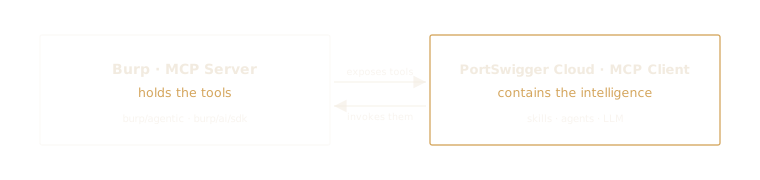 The MCP roles: Burp exposes the tools, while the cloud holds the intelligence.
To get a sense of what we’re dealing with, I unpacked the contents of the two directories.
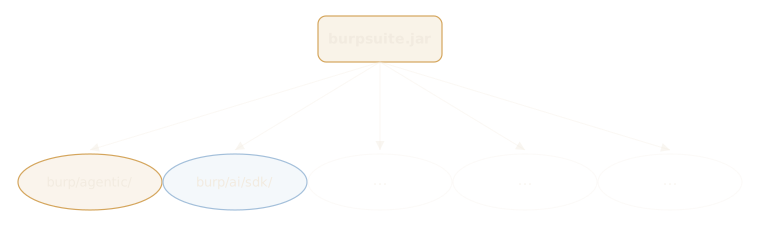 Figure 2 — The AI-related directories in Burp Suite’s JAR package.
There are two main AI agent-related directories: burp/agentic and burp/ai/sdk. Further inspection of the contents revealed what each directory is responsible for handling:
burp/agentic– the Agentic AI tools. This directory defines and configures the 54 tools that the AI agent can perform.burp/ai/sdk– the transport to the MCP client. This directory defines how Burp communicates with the AI on PortSwigger’s cloud.
Inside these two directories are Java classes grouped in folders relevant to their purpose.
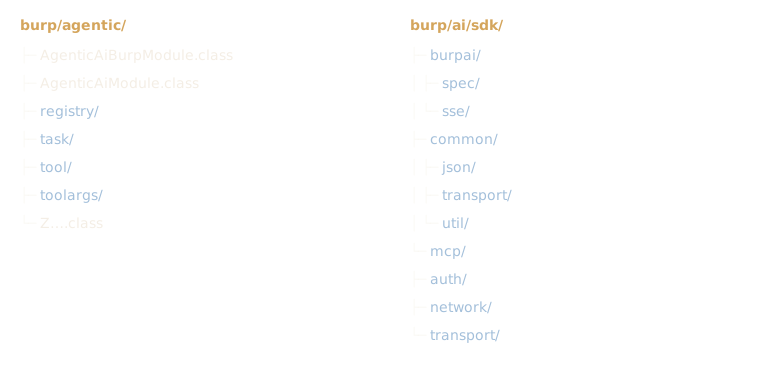 Figure 3 — The subdirectories and classes under the AI-related directories.
The burp/agentic directory consists of four subdirectories, two Agentic AI module classes, and a bunch of obfuscated Z classes. I used CFR to decompile the classes into readable Java files so I could trace the end-to-end workflow. A comprehensive analysis reveals five Agentic AI SDK engineering patterns that I’d like to discuss.
The five agentic-AI engineering patterns
Before diving into each one, here’s the whole picture — the five patterns mapped onto Burp AT’s live workflow, from your prompt to the cloud and back. Skim it as a map; each pattern below zooms into one numbered badge.
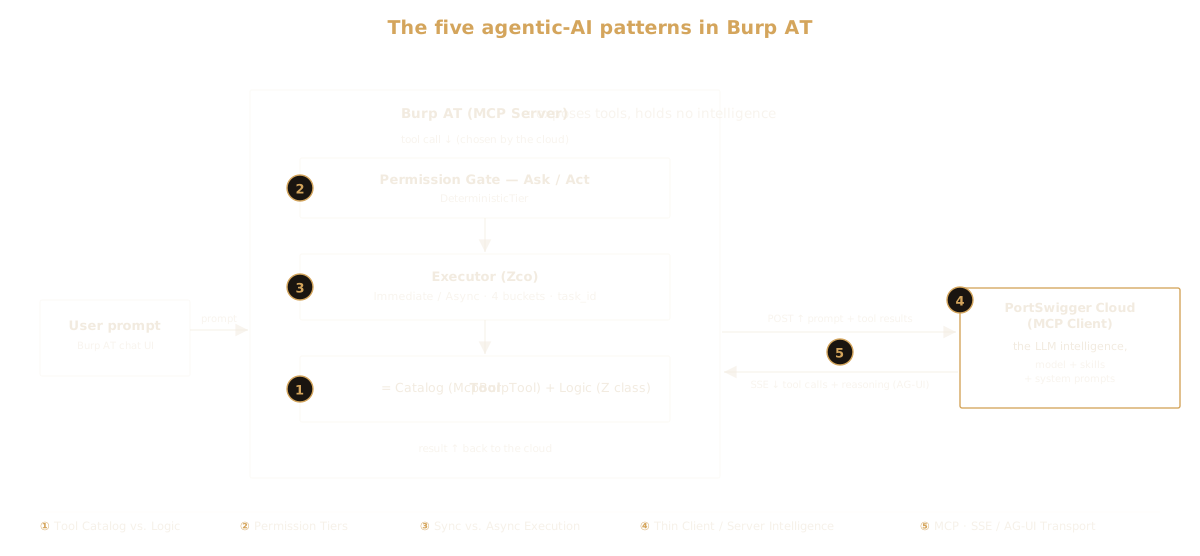 Figure 4 — The five agentic-AI patterns mapped onto Burp AT’s workflow.
Pattern 1: Tool Catalog vs. Tool Logic Separation
The Practice
Designing a robust AI Agent architecture involves identifying its components and separating them by function. Matt Pocock talks about Deep Modules and Shallow Modules at the AI Engineer Europe stage, and this framework surfaces as I write about this section. He advised hiding complexity by building fewer interfaces with lots of functionality, rather than many small interfaces without much functionality. This is directly reflected in how Burp Suite groups each class in its respective directories.
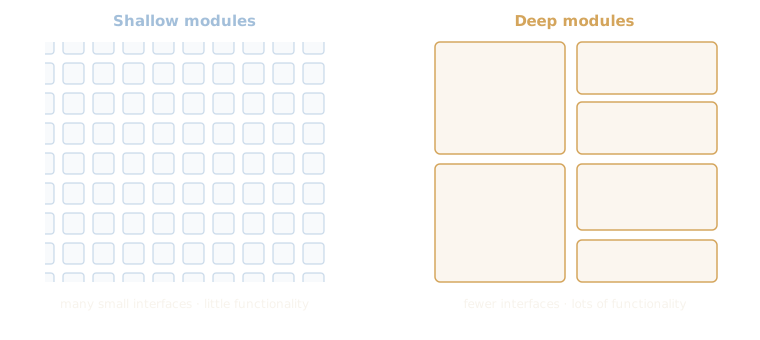 Figure 5 — Shallow modules vs. deep modules.
On top of that, Burp separating the tool catalog and tool logic solves the entanglement problem, where AI tools’ logic blends with environment variable loading, retry loops, function declarations, and all the infrastructure code in a single file.
The tool’s logic is the least-touched part of every Agentic AI build, in contrast to other infra code such as the loader and the enum catalog, which are called more often. Separating them cuts runtime since the logic only loads on demand.
Recommended reads:
- “Software Fundamentals Matter More Than Ever” – Matt Pocock
- Separating Agent Logic From Runtime: The Case for a Managed Agent Layer
- Scaling Managed Agents: Decoupling the brain from the hands
How Burp Suite Does It
Burp Suite defines its 54 Agentic AI tools in the tool/ subdirectory, specifically the McpBurpTool class. This class defines all existing tool names, descriptions, group, deterministic tier, and their relevant information, independent of the tool’s logic.
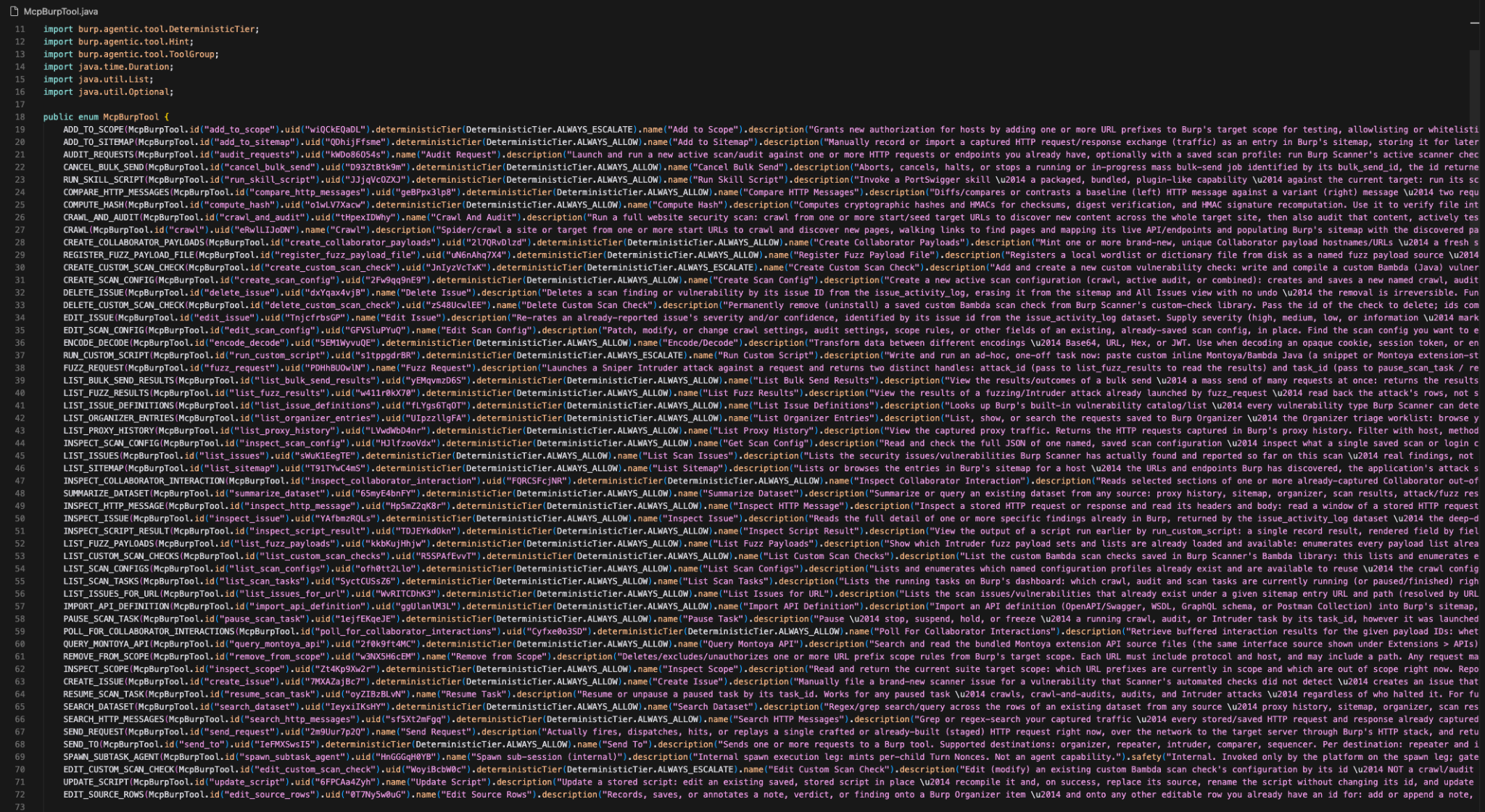 Figure 6 — McpBurpTool class.
While the tool/ directory provides a framework for every tool, it does not define them. The logic is built in the obfuscated Z classes that live directly under the burp/agentic/ directory. Let’s sample one tool, ENCODE_DECODE’s Z class, and focus on three components:
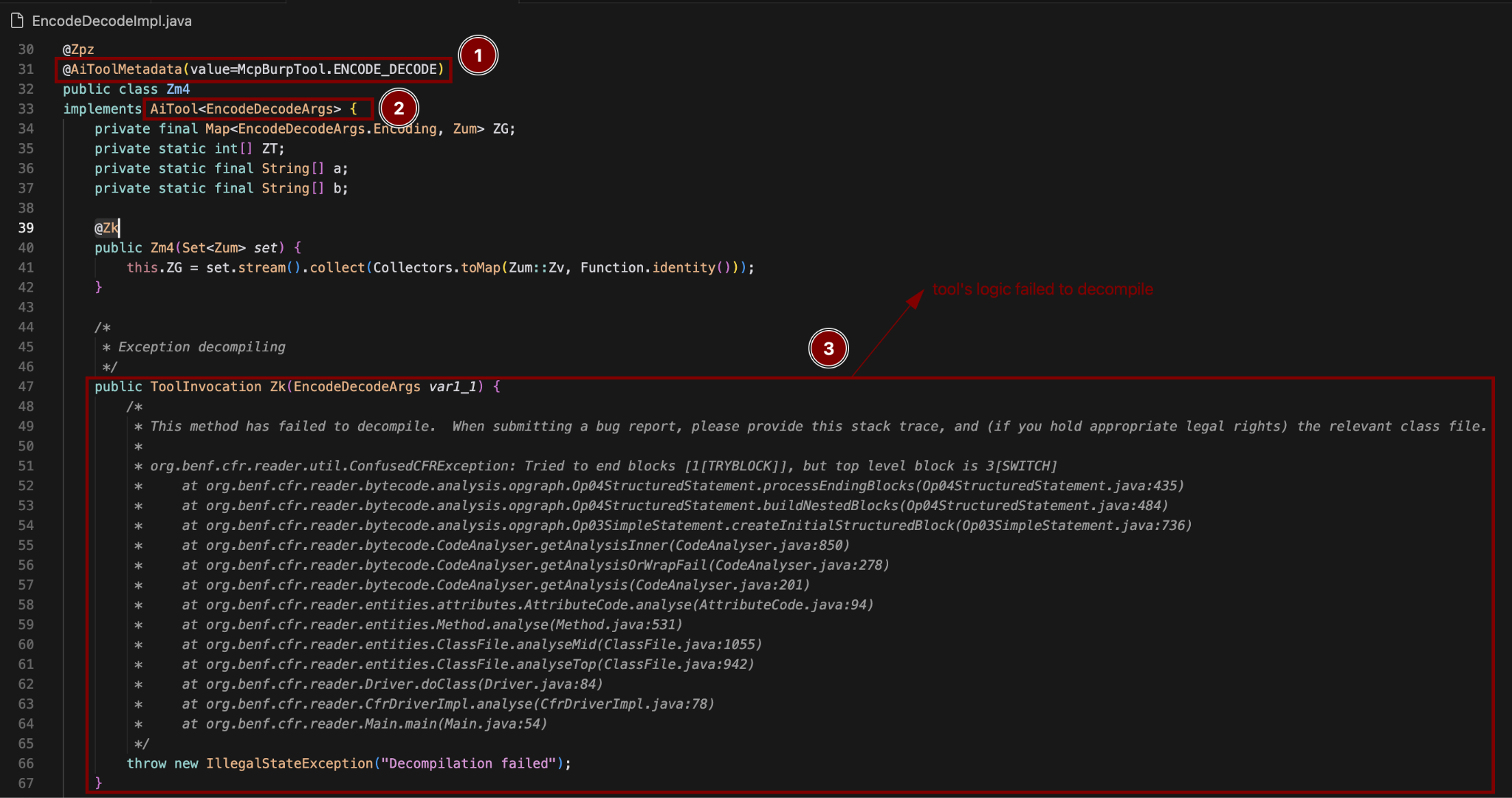 Figure 7 — EncodeDecode tool implementation.
Component 1: @AiToolMetadata
We’ve seen that a tool’s metadata is stored in the McpBurpTool class, while its logic is in the corresponding obfuscated Z class, as shown in the screenshot. Despite being written in two different places, how do they interconnect?
The @AiToolMetadata tag is the thread that ties a tool’s implementation (the Z classes) to its catalog entry (the McpBurpTool enum). It helps answer the question, “Which tool is this Z class?” This implementation separates “what a tool is” (its metadata) and “what the tool does” (its code) cleanly, which benefits Burp Suite’s design:
- Separation between readable metadata and executable logic. A non-obfuscated
McpBurpToolenum made every tool’s query efficient. Given that this class is consumed by many (Burp’s Settings UI being one of them), lookup needs to be quick. Meanwhile, the tool’s logic is called less frequently. - The tool’s deterministic tier lives in one place. Instead of each tool class defining its own tier, it’s set once per tool on the
McpBurpToolenum (a fixed default baked in at build time), so that when the agent invokes a tool, the engine reads a single authoritative tier to decide whether the call runs automatically (Act) or pauses for confirmation (Ask). Users can override this via the Burp AT interface, which will only affect the runtime settings, so neither the tool’s logic (theZclass) nor the shared metadata default is modified. - Pairing annotations with enum class results is cheaper than calling a method. Defining the metadata as an enum class rather than writing it in the obfuscated
Zclass, and calling it with an annotation rather than a function call, allows the engine to read the tool definition directly. This prevents the engine from wasting resources on constructing the object just to make the function call.
How it works:
class Zm4  ──@AiToolMetadata(McpBurpTool.ENCODE_DECODE)──▶  McpBurpTool.ENCODE_DECODE
(behavior)                                                  (metadata: id, description, tier, group)
Component 2: AiTool<A extends Record>
Just like any other functions that take arguments, these tools do too; their arguments are defined in the toolargs/ directory. This folder contains one class file for every tool that requires argument(s), although the args file name may be slightly different from the tool name itself. The AiTool component binds a tool to its args record via the type parameter.
Tool-args vs. sub-structures
With AI’s help, I counted the number of tools that take arguments to see if it maps cleanly to the args classes defined in the toolargs/ directory. The result shows an accurate count:
- 90 top-level classes in
toolargs/: 64 records (declare extendsjava.lang.Record), 22 enums, and 4 interfaces. - Out of the 64 records: 54 are tool-specific
*Args(one per tool) and 10 are shared sub-structures composed into the tool-specific arg classes.
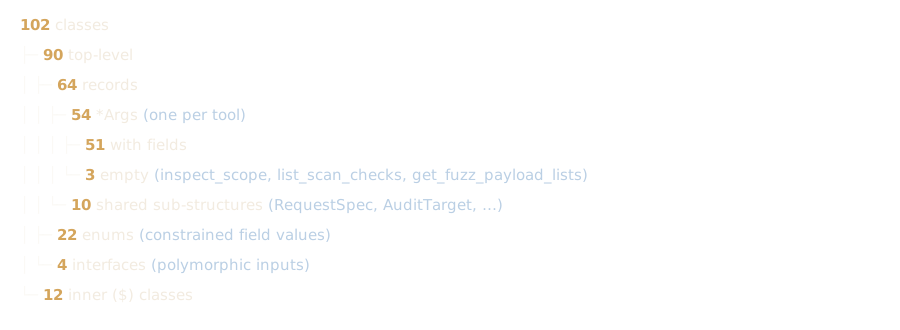 Figure 8 — The toolargs/ directory structure.
The arithmetic adds up to 54 *Args records: 51 carry at least one field (parameter), and 3 have none, with an additional 10 shared sub-structures. The *Args record contains mixed field types including but not limited to: String, boolean, int, List, Map, Optional<…>, enum.
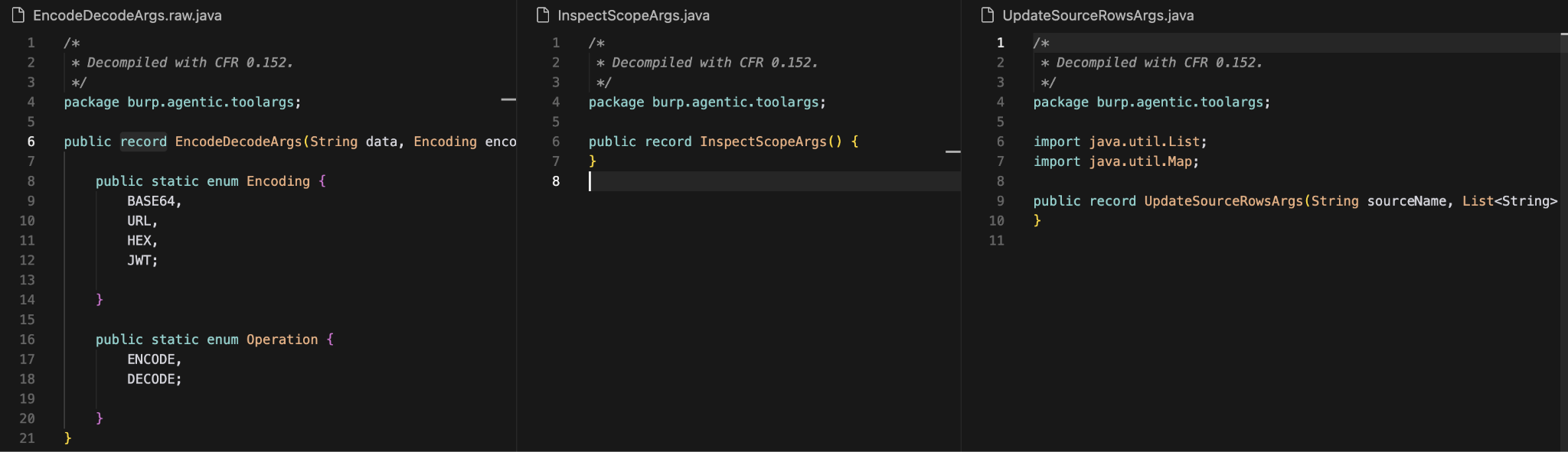 Figure 9 — The *Args records.
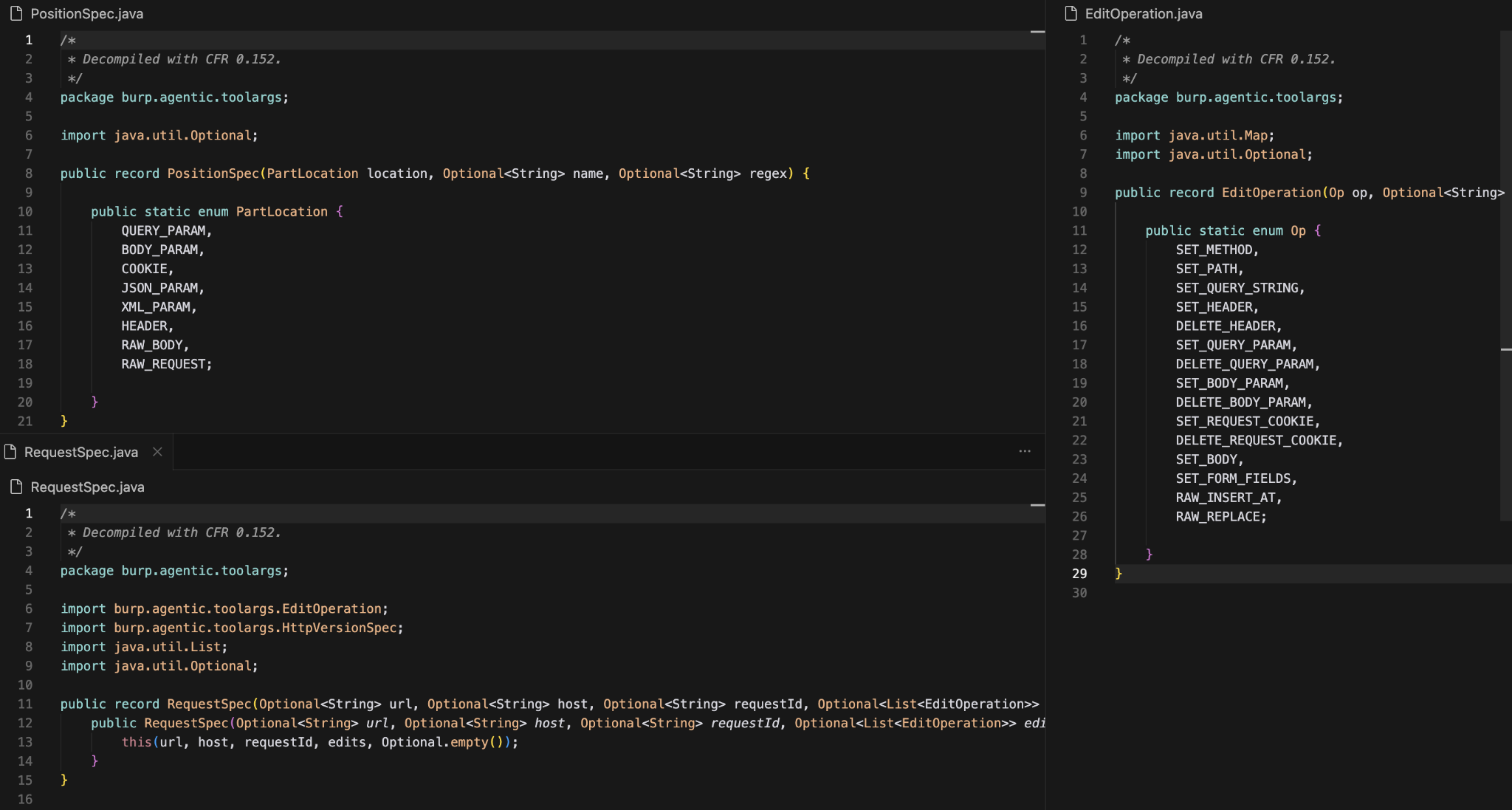 Figure 10 — The shared sub-structures.
Two signals distinguish a tool-args class and a sub-structures class. (1) The class name itself, whether it ends with *Args, and (2) whether the class is a component of another record or a tool class. Let’s see what the second signal looks like in the implementation, sampling RequestSpec. It is a component of three other record files, but none in any of the Z classes.
Note: please ignore the match counts since only selected Z classes are decompiled for this demo.
 Figure 11 — Presence of RequestSpec in toolargs/.
Meanwhile, SendRequestArtifactArgs (which has the RequestSpec component) does not appear in any other record’s header and sits only inside Zbq’s AiTool implementation and ToolInvocation function call. It is also worth noting that SendRequestArtifactArgs is a tool’s input because it’s a component of AiTool<...>.
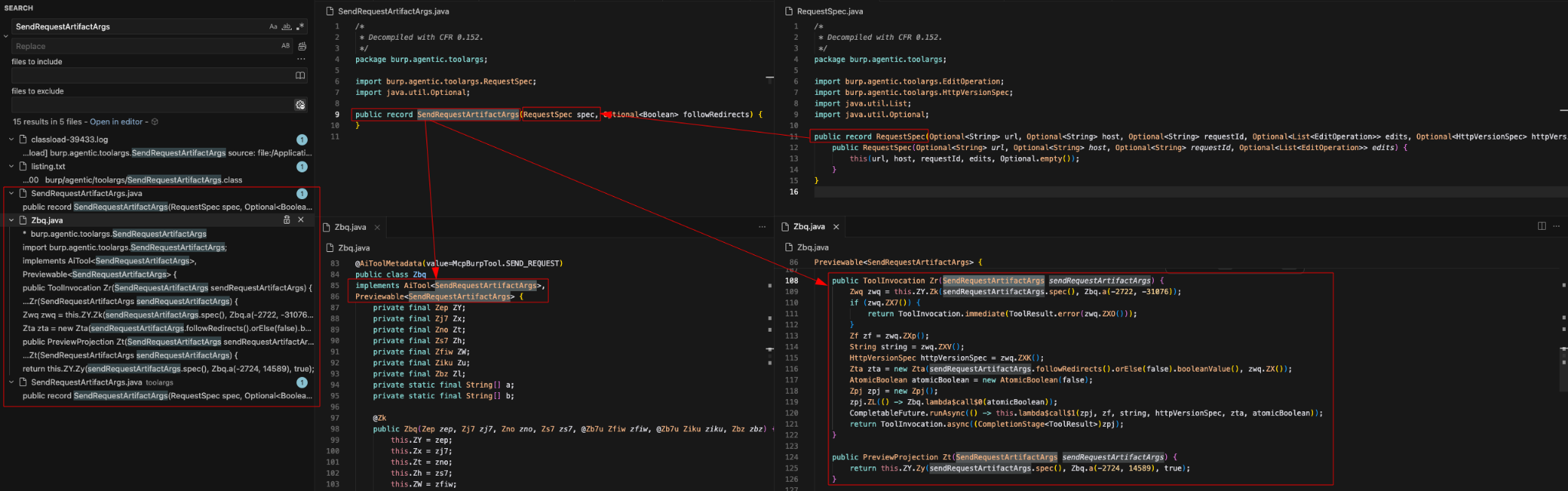 Figure 12 — Presence of SendRequestArtifactArgs in the JAR file.
Component 3: A call() function that returns ToolInvocation
Every tool has its own logic written as functions in its respective Z classes. This series of function calls will eventually return a value to the MCP Bridge as a ToolInvocation object that carries a ToolResult. The actual return value lives in ToolResult, while ToolInvocation indicates whether the result is ready now (Immediate) or comes later (Async).
Pattern 2: Permission Tiers
The Practice
Governance has been an early concern of AI for many years. The premise was to prevent AI-driven harms, especially in fields where offense is the default action verb. PortSwigger built Burp AT with awareness in mind, scoping permissions not only towards the attack target but also for each tool.
Ideally, any autonomous actions must follow these three rules to be considered maturely governed:
- All assets are inventoried, and their permissions are scoped by consequence.
- Human oversight is put where the consequences are.
- A continuous governance discipline is implemented at every step.
While there are many ways to govern AI tools, these are arguably the minimum requirements, especially for AI Agents doing offensive security work.
Recommended readings:
How Burp Suite Does It
Recall that every tool defined in the McpBurpTool has a DeterministicTier field. This field maps to an enum class defined by Burp. It decides whether a tool needs a user’s permission to be invoked. Its value would be either ALWAYS_ALLOW, ALWAYS_ESCALATE, or UNSPECIFIED, and is reflected in Burp AT’s UI in its Manual Settings.
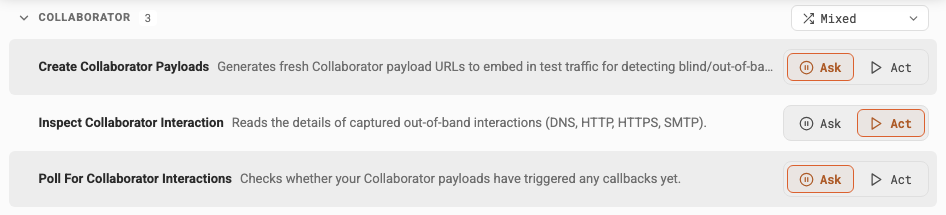 Figure 13 — Ask/Act: whether to stop and ask for user permission before using the tool.
It is what differentiates Burp AT from Burp AI. This strictly guards the offensive tools, so it performs actions only within the user-defined scope.
Pattern 3: Sync vs. Async Tool Execution
The Practice
Orchestrating AI agents to complete a complex task often translates to delegating the job to multiple sub-agents. Though the primary motive is to avoid cluttering the main agent with context, spawning sub-agents with intention presents multiple benefits. Parallelism, for instance, allows multiple tasks to be executed concurrently, saving users a lot of time.
The difference between sync and async lies in whether the parent agent waits for the sub-agent to return a result before taking the next step, or lets the sub-agent run independently and continues with its original workflow. There are two things worth knowing when deciding which sub-agent to fire:
- Whether the delegated task requires a long time to complete.
- Whether the parent agent’s next step is dependent on the sub-agent’s result.
Normally, method selection depends on whether the parent agent’s next step needs the sub-agent’s result. Burp AT, however, classifies each tool by its estimated execution time into four buckets. Hence, the following Immediate or Async labels describe how the result is returned, which is why a tool can be Async yet awaited inline, or Immediate yet handed off as a background task.
Recommended readings:
- Three sub-agent patterns you need for your agentic system
- Multi-Agent Orchestration in Python: Sync, Async, and Auto Mode Explained
- Building effective agents
How Burp Suite Does It
When a tool runs, it might finish right away, or kick off a long-running task and return the result later. Upon completion, the tool returns an object: either Text or Error. These are handled in the same tool/ subdirectory by these two classes:
ToolInvocation.class: defines when the result returns (ImmediateorAsync).ToolResult.class: defines what the tool returns (TextorError).
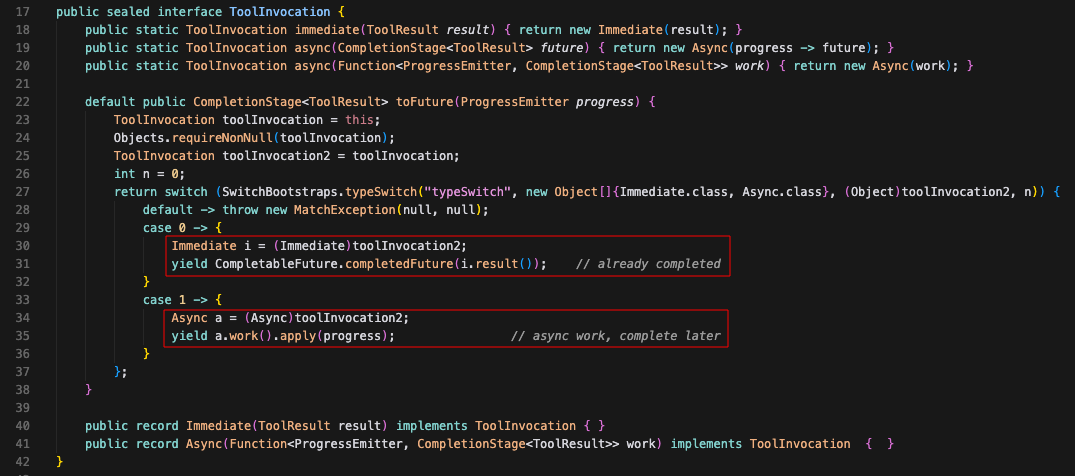 Figure 14 — Whether a tool returns results immediately or asynchronously.
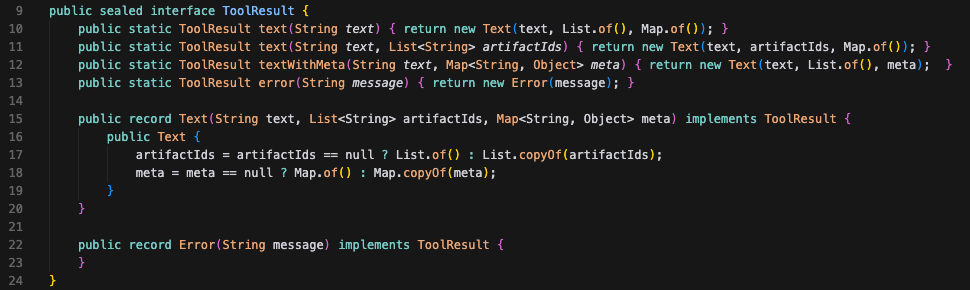 Figure 15 — Text and Error objects are each tool’s return types.
If forced to categorize these tools based on the tool’s wait time, there would be four buckets:
- Instant result
- A short amount of time (awaited inline, no timeout cap)
- Might run for a while (converted to background task if exceeding timeout)
- Duration to completion is unknown
These four buckets answer the question of: “Can we put a tolerable ceiling on the wait?” Each bucket maps to a mechanism (Immediate or Async), with Bucket 3 carrying a syncWindow on top of Async and Bucket 4 adding a task_id on top of Immediate. The mechanisms are referenced from the tool’s labels in their McpBurpTool metadata (syncWindow or longRunning).
| Bucket | Wait time | Mechanism | Flag | Examples |
|---|---|---|---|---|
| Instant | None (instant) | Immediate | none | encode_decode, compute_hash, inspect_scope |
| Awaited inline | Until completion | Async | none | summarize_dataset, list_issues_for_url, edit_source_rows |
| Awaited inline with handoff possibility | Up to 15 seconds | Async | syncWindow | send_request, run_custom_script, poll |
| Known long-running | None (assigned task_id) | Immediate | longRunning | crawl, crawl_and_audit, fuzz_request |
Bucket 1: Immediate result. Tools that return a result instantly. They fall into this bucket and implement the ToolInvocation.Immediate() mechanism. These tools have no specific labels attached to them and await completion.
Bucket 2: Completion awaited inline. Tools that are awaited inline with no hard-cap timeout fall into this category. These tools implement the ToolInvocation.Async() mechanism, which holds the call open. The bridge waits for the tool to finish and return a result before passing it over the MCP/SSE transport to PortSwigger’s LLM to determine the subsequent step.
Bucket 3: Timeout cap with background task conversion. Not to be confused with the second bucket, tools in this bucket are given a 15-second wait time and handed off as a background task if they exceed the timeout limit. These tools implement the ToolInvocation.Async() mechanism with an additional syncWindow object in their metadata.
Bucket 4: Unpredictable completion time. These are tools that are known to be long-running (minutes to hours). Burp assigns a task_id to these tools so they can run in the background, while allowing other tools to run in parallel. These tools have a longRunning object attached to their metadata, which tells the agent that a background task will be spawned when this tool is invoked. It implements the ToolInvocation.Immediate() paired with a task_id mechanism.
The Zco class shows the buckets in action. This class is an MCP adapter that has two main jobs: (1) registers Burp’s internal tool types into an MCP tool spec, and (2) handles an incoming tool call and routes it to one of the three executors, as shown in the snippet below:
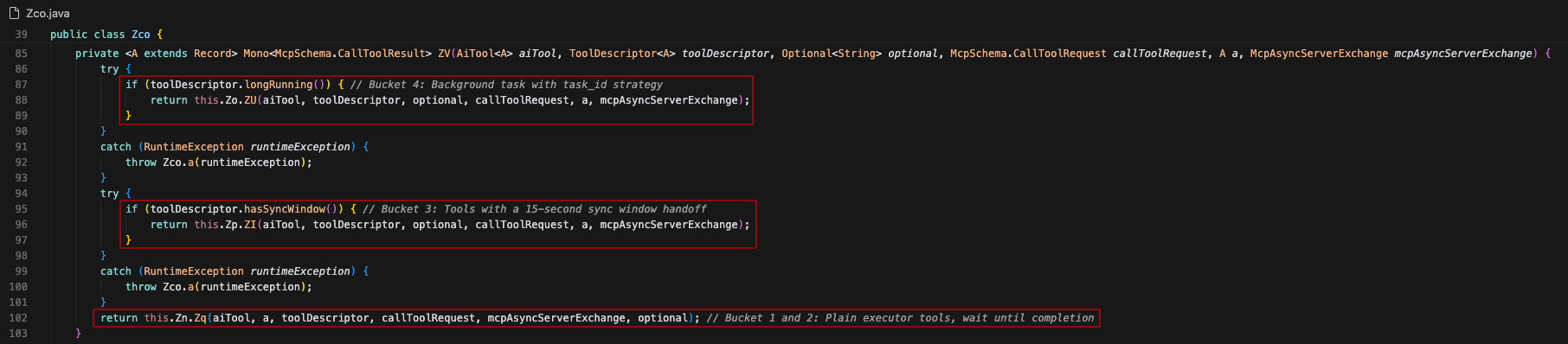 Figure 16 — Zfq handles Buckets 1 and 2, Ztg = Bucket 3, Zse = Bucket 4.
burp.agentic.task.* was never referenced: Bucket 3's SyncWindow != task/SyncWindow.class?
Despite there being a class of the same name, SyncWindow in Bucket 3 originated from the McpBurpTool enum in the burp.agentic.tool package. It is a java.time.Duration field instead of a class, and the two are unrelated.
javap -p all/burp/agentic/tool/McpBurpTool.class | grep -i syncWindowprivate final java.time.Duration syncWindow;
public java.util.Optional<java.time.Duration> syncWindow();The question of whether the task/ classes are invoked anywhere in the JAR arises. My initial assumption that it was being used to support long-running tasks was broken by the fact that the Async tools did not reference any classes from task/, and instead referenced McpBurpTool.
for c in Zse Ztg Zfq Zf7; do
  hits=$(javap -v -p all/burp/agentic/$c.class 2>/dev/null | grep -c "agentic/task/")
  echo "$c -> agentic/task refs: $hits"
done
Zse -> agentic/task refs: 0
Ztg -> agentic/task refs: 0
Zfq -> agentic/task refs: 0
Zf7 -> agentic/task refs: 0Broadening the search to the entire JAR file shows zero counts of task/ references.
grep -rla "burp/agentic/task/" all 2>/dev/null | sed 's#all/##' | grep -vc "^burp/agentic/task/"0So yes, static analysis shows that Bucket 3’s SyncWindow is different from the SyncWindow class defined in task/, and none of the classes in the task/ directory are referenced anywhere in the JAR bundle.
Pattern 4: Thin Client, Server-Side Intelligence
The Practice
The concept of a thin-client, server-side intelligence existed for many years. The idea is to centralize processing power, security, and management, while keeping the client’s interface lightweight. This brings a huge benefit to organizations that provide AI agent tools to their users, where intelligence is a high-value asset.
Keeping system prompts and skills centralized on the server enables organized management: a single change can directly affect all users. This, of course, requires the server to be highly secured from adversaries, as a fatal breach affects multiple users. With strong and adequate protection, this reduced attack surface is a secure implementation itself.
Recommended readings:
How Burp Suite Does It
PortSwigger’s cloud hosts an AI model that decides which tools to invoke based on the user’s Burp AT prompt, and what to do next given a tool’s output. This is the server-side intelligence that stores all the skills and system prompts that drive the engagement.
Meanwhile, Burp’s side only exposes the tools without any intelligence. Burp Suite uses Guice, a Java dependency injection library, to bind the 54 AI tools to a registry. This registry is a source of truth listing every tool that the cloud’s LLM can call.
The registry/ subdirectory: dormant, but reveals how tool-binding works
Looking into how the code is written in the registry/ folder, one might assume that the classes in this folder read as if they work together to collect and catalog the 54 tools at startup, given its workflow:
- The only class referencing
registry/,AgenticAiModule, creates a new binding toToolRegistry. ToolRegistryreceives the tool set through the@Injectannotation, then loops over it at startup and passes it toToolDescriptors.ToolDescriptorsreads the tool’s annotation value, resolves each entry, then returns aToolDescriptorobject containing each tool’s metadata toToolRegistry.ToolRegistryproduces a mapping of each tool and itsToolDescriptorobject.
The process stops at step 4, and no single tool is added to the binding. Technically, a tool could only be bound upon calling Guice’s addBinding().to(...) function, but none was found in the current workflow. This diagram shows what an ideal workflow would look like.
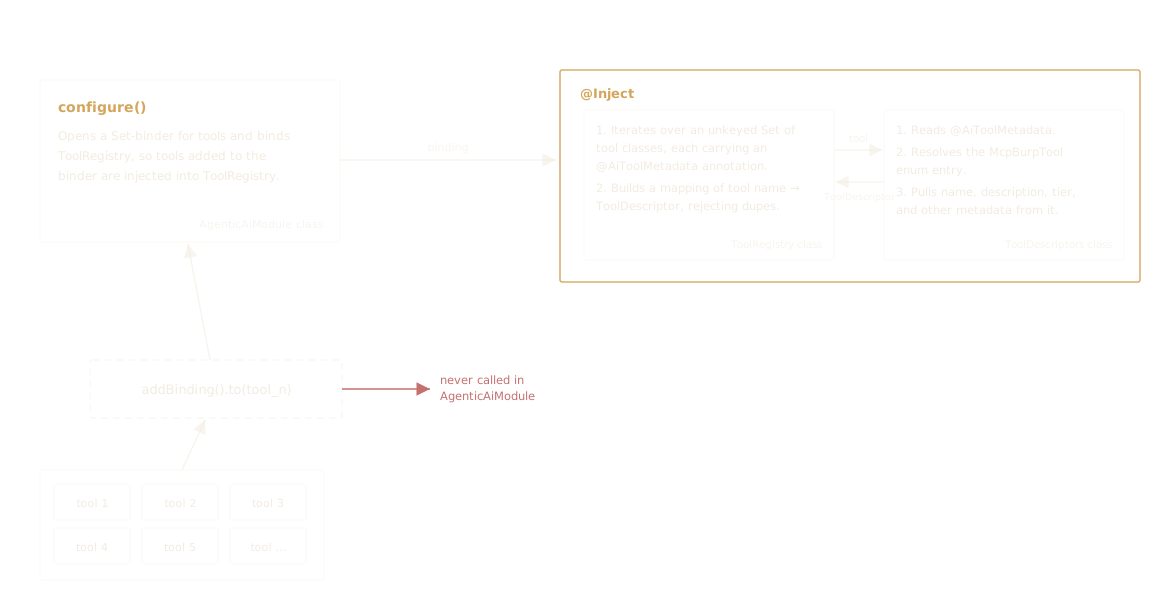 Figure 17 — Tool registration workflow.
This left us with one last file to inspect, the AgenticAiBurpModule class. It consists of five Z-class function calls, which we will examine with dynamic analysis.
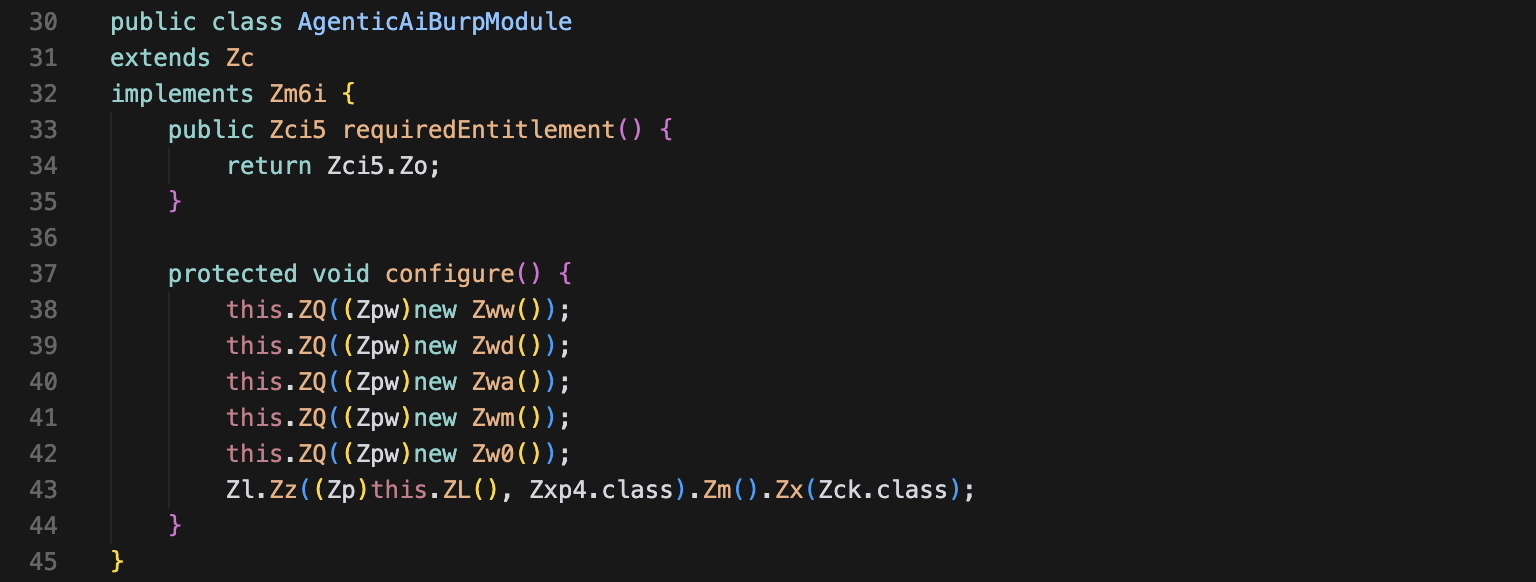 Figure 18 — AgenticAiBurpModule class.
Dynamic analysis of the AgenticAiBurpModule class
While static analysis gave us a comprehensive understanding of how Burp AT was architected, dynamic analysis would either prove or break the derived hypotheses and show how the tools actually operate.
I decided to sample CRAWL_AND_AUDIT, a known long-running tool that will return an Immediate value, which is task_id, and dispatch the actual task to a background process. While doing so, the events are captured and written into a log file. The tool used for dynamic analysis is the JVM’s Unified Logging Architecture.
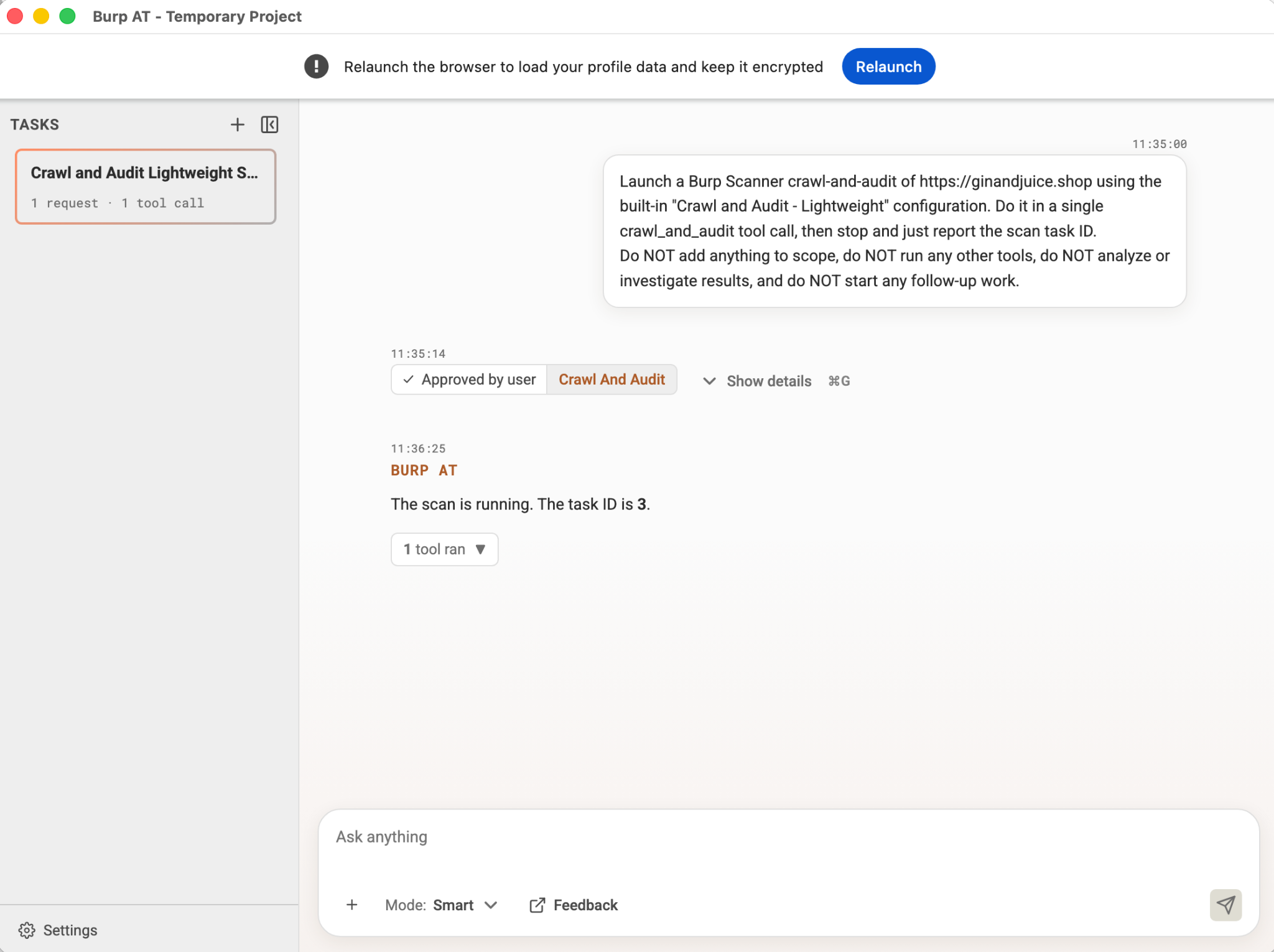 Figure 19 — Burp AT dynamic analysis to capture the logs upon Burp’s startup.
This prompts Burp AT to launch a task that can be analyzed on its dashboard.
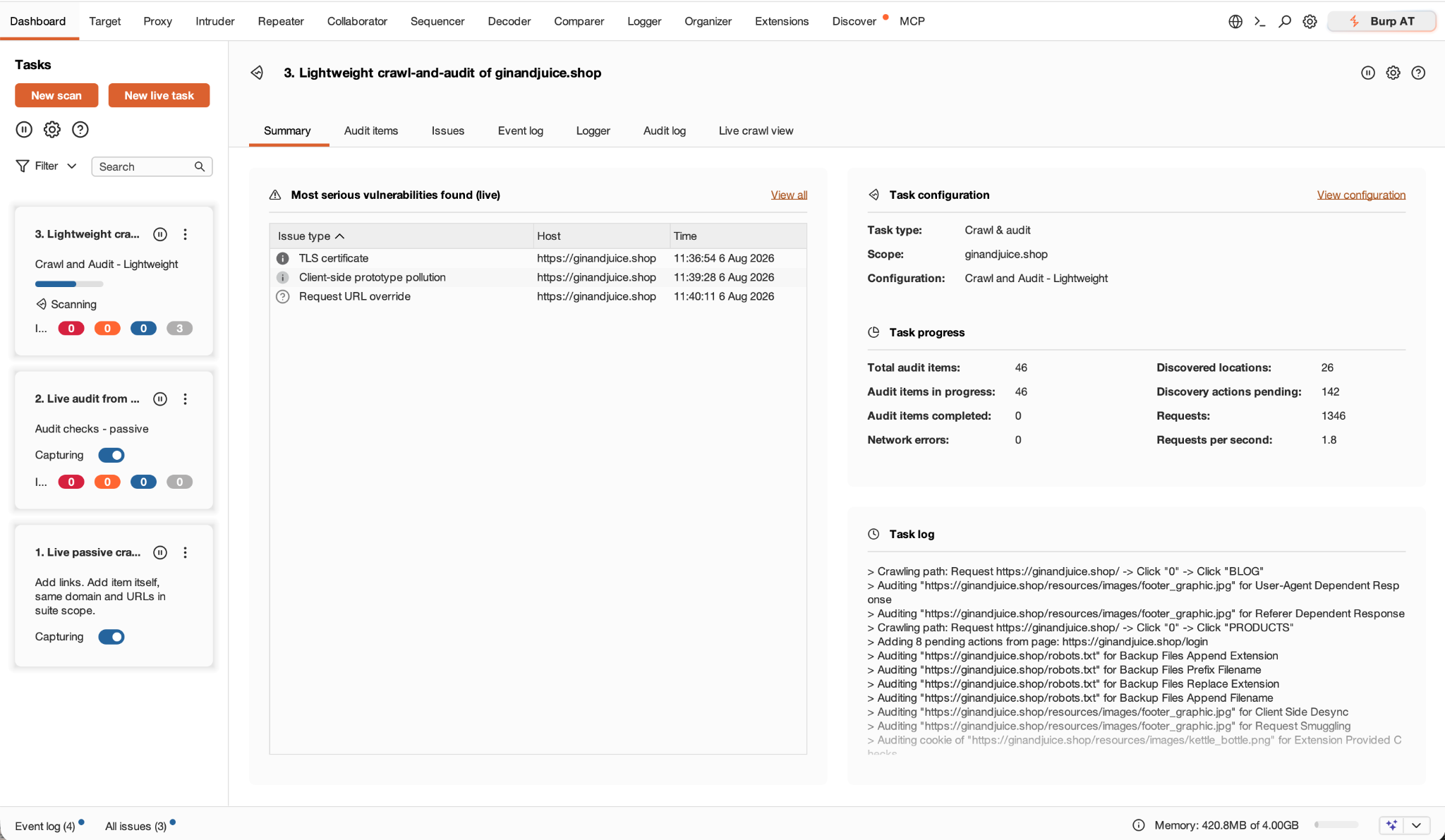 Figure 20 — Burp’s live task.
Dynamic analysis reveals something about the registry/ directory: it was never referenced outside its class. Upon inspecting the log and retrieving the loaded unique class counts, both registry and task show 0 loads.
CL=classload-39433.log
uniqcls() { grep -oE "class,load\] [^ ]+" "$CL" | cut -d " " -f2 | sort -u; }

echo "burp.agentic.* total       : $(uniqcls | grep -c '^burp\.agentic\.')"
echo "  tool.*                   : $(uniqcls | grep -c '^burp\.agentic\.tool\.')"
echo "  toolargs.*               : $(uniqcls | grep -c '^burp\.agentic\.toolargs\.')"
echo "  registry.*               : $(uniqcls | grep -c '^burp\.agentic\.registry\.')"
echo "  task.*                   : $(uniqcls | grep -c '^burp\.agentic\.task\.')"
echo "burp.ai.*                  : $(uniqcls | grep -c '^burp\.ai\.')"
echo "io.modelcontextprotocol.*: $(uniqcls | grep -c '^io\.modelcontextprotocol\.')"
burp.agentic.* total : 873
tool.* : 24
toolargs.* : 98
registry.* : 0
task.* : 0
burp.ai.* : 75
io.modelcontextprotocol.*: 259I traced the log to pin down where the registry directory is called from. Turns out it was referenced nowhere but in the AgenticAiModule, which binds ToolRegistry and AgentToolBinder. Interestingly, log inspection shows that AgenticAiModule was never loaded at runtime.
 Figure 21 — AgenticAiModule text search reveals zero matches in the log.
So where is the registry, and how are the tools bound to it?
Recall that the AgenticAiBurpModule class from the burp/agentic/ directory hasn’t been inspected. The log file verified that the class was loaded at runtime and referenced multiple times during execution.
 Figure 22 — AgenticAiBurpModule is loaded upon startup.
Building on the knowledge that Burp uses a multibinder to bind all the unique AI tools to the registry, it makes sense to look up where Guice multibindings were imported and identify how many distinct burp.agentic.Z* classes are referenced in the five Z classes.
for c in Zww Zwd Zwa Zwm Zw0; do
  unzip -oq burpsuite.jar "burp/agentic/$c.class" -d clean 2>/dev/null
  java -jar cfr.jar "clean/burp/agentic/$c.class" > "$c.java" 2>/dev/null
  lines=$(wc -l "$c.java" | tr -d ' ')
  mb=$(grep -c "multibindings" "$c.java")
  zref=$(grep -oE "burp\.agentic\.Z[a-z0-9_]+" "$c.java" | sort -u | wc -l | tr -d ' ')
  printf "%-4s  %4sL  multibindings-import=%s  distinctZrefs=%s\n" "$c" "$lines" "$mb" "$zref"
done
Zww 51L multibindings-import=0 distinctZrefs=2
Zwd 426L multibindings-import=2 distinctZrefs=130
Zwa 32L multibindings-import=0 distinctZrefs=6
Zwm 140L multibindings-import=0 distinctZrefs=19
Zw0 581L multibindings-import=0 distinctZrefs=9Two strong signals point to Zwd as the sub-module that binds all the tools:
Zwdis the only one importingmultibindings, a Guice library used to build aSet<AiTool>that is populated with the 54 tools.- 130 distinct
Z-class references are significant compared to the other four. Given that we have 54 AI tools to register, the submodule is worth inspecting.
The Zwd class simply contains one function: configure(). It instantiates a new object Zl, then the rest of the function is mostly zl.Zm().Zx(...) calls.
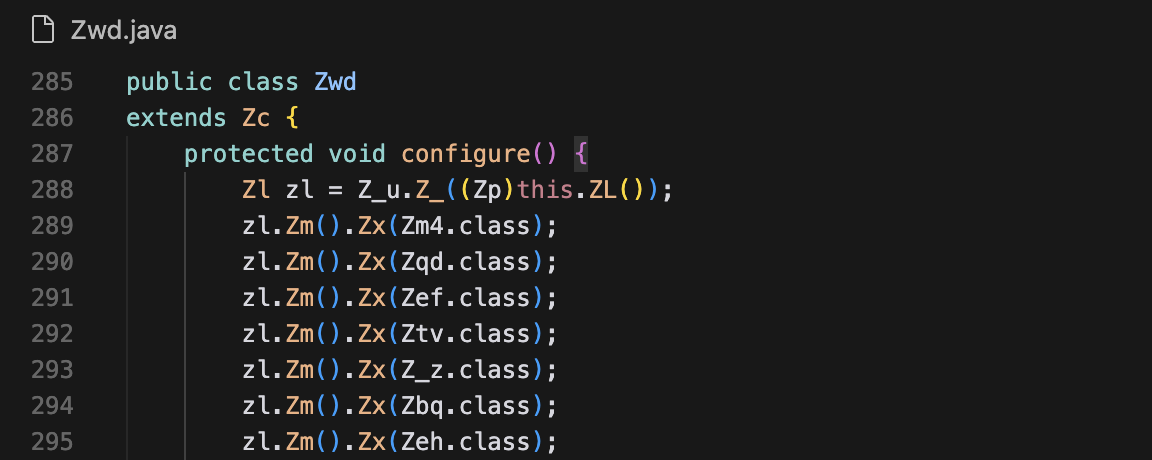 Figure 23 — The Z-classes that are bound to the registry.
To understand what it does, I used AI to help me deobfuscate the function, which results in:
protected void configure() {
    Multibinder<AiTool<?>> tools = AgentToolBinder.newBinder(binder());
    // Z_u.Z_(this.ZL())  =  Multibinder.newSetBinder(binder(), new TypeLiteral<AiTool<?>>(){})

    tools.addBinding().to(Zm4.class);   // zl.Zm().Zx(Zm4.class)  → encode_decode
    tools.addBinding().to(Zqd.class);   // zl.Zm().Zx(Zqd.class)  → compute_hash
    tools.addBinding().to(Zef.class);   // zl.Zm().Zx(Zef.class)  → add_to_scope
    // … 51 more addBinding().to(...) calls, one per tool
}
Referencing Figure 17 on how a tool would be successfully bound: it needs an addBinding().to(...) function. In this class, Z_u.Z_(binder) sets up the multibinder, then zl.Zm().Zx(), which was precisely the addBinding().to(...) function, was invoked 54 times to populate the multibinder, once for each tool.
The rest of the workflow is similar to what the diagram shows. The bound tools are injected into the registry, except they’re then transported via SSE to PortSwigger’s cloud.
After the tool binding: injecting the set into the registry
After the AiTool multibinder is created and populated, it is injected into the Ze4 class, and a HashMap of the tools is built from the injected classes. Here is how Ze4 looks, but I want to emphasize the @Zk annotation and the Ze4 constructor’s parameter type, which are the two things that contribute to how the tool set arrives at this point.
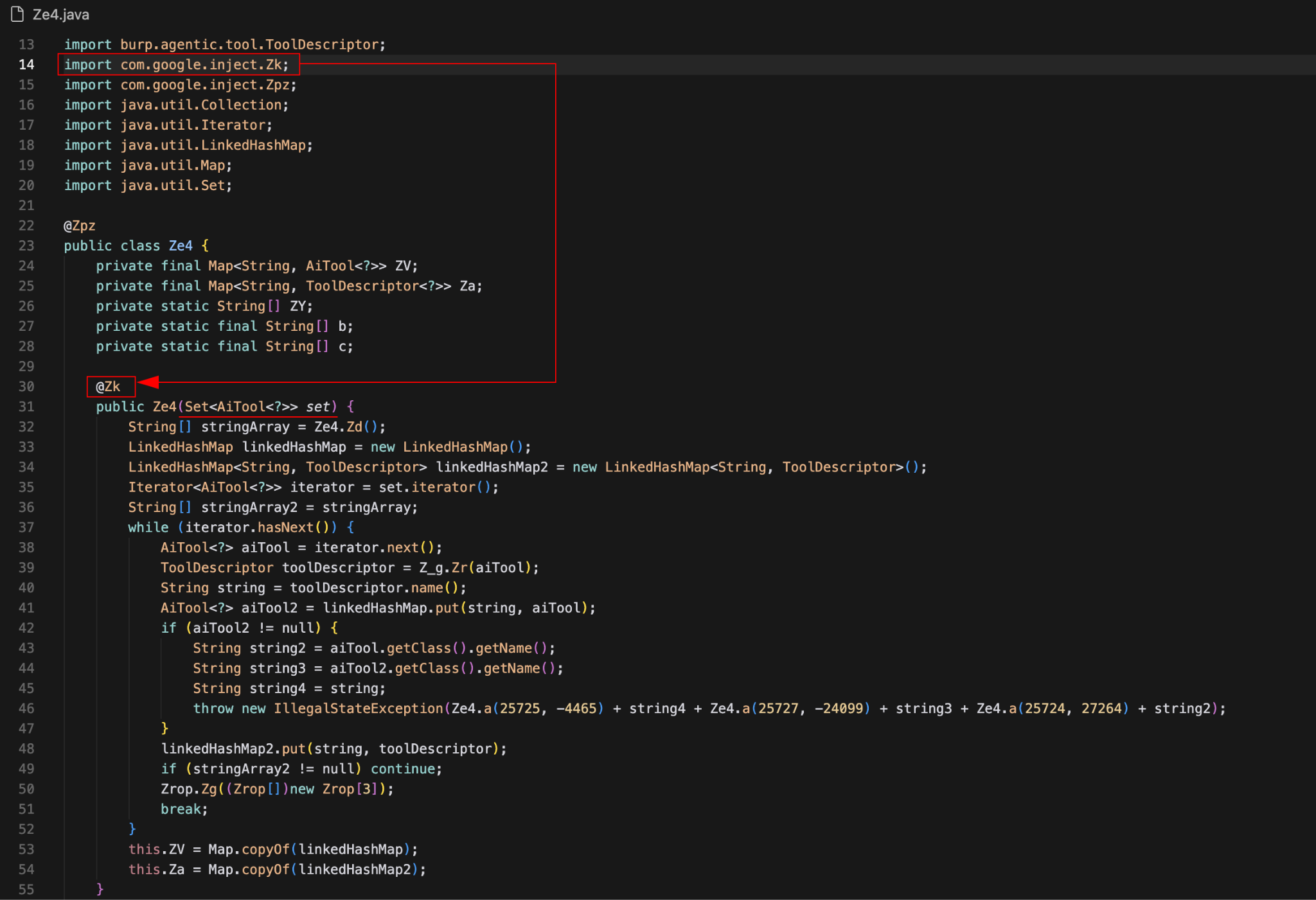 Figure 24 — The two components that control the Set’s injection.
Component 1: the @Zk annotation
A quick framework inventory of Ze4 shows that Zk is Google Guice’s com.google.inject, and the code itself resembles the open-source Inject.java class on GitHub.
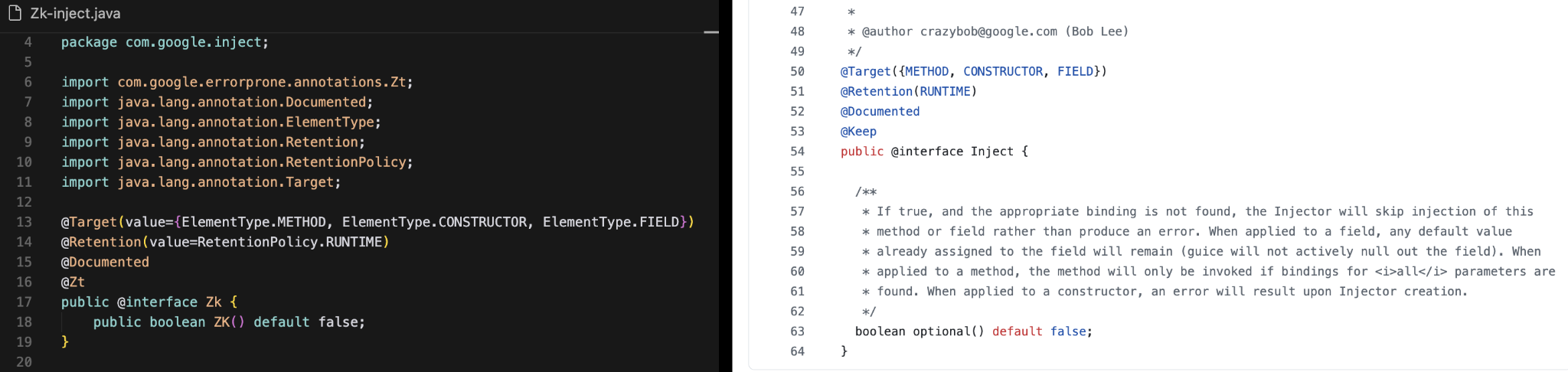 Figure 25 — Burp AT’s Zk class and Guice on GitHub, side by side.
Recall that the tools that are added to the Set binder via the tools.addBinding().to(Z_class) function would get bound to the class with the @Inject annotation.
Component 2: the AiTool<?> set
The Zk Inject annotation is used across many tool classes, so how does the engine know where to inject the AiTool Set?
Guice matches producers (providers) to consumers (injection points) by type. Every tool class constructor’s parameter type differs, and only Ze4 takes the AiTool multibinder as its argument, aside from the stale ToolRegistry class. With the multibinder created and populated, and Ze4’s @Inject constructor specifically requesting AiTool, Guice can and will inject the multibinder when it builds Ze4.
The rest of the class is straightforward: a new map containing the 54 AiTool instances and their names (from the source of truth: McpBurpTool) is created. They live in a class that handles the communication for these tools and the AI behind PortSwigger’s cloud. We refer to this class as the registry.
Pattern 5: MCP as the Transport, Streaming Down Over SSE/AG-UI
The Practice
Notice how your AI agent thinks out loud? That is usually SSE and the AG-UI protocol working together. SSE streams events in real time, and AG-UI structures them so users can watch the agent synthesize a response. This allows users to see messages like “Checking all the available tools…” instead of a generic “The AI is thinking”.
AG-UI is particularly useful for systems that require tool progress exposure to the user. It also serves as an adapter that coordinates different backends, making it easy to integrate more infrastructure as the system expands in the future.
It is important to note that Burp AT’s AI model can’t be derived from the traffic or AG-UI protocol, a consequence of having a thin client. AG-UI is both transport-agnostic and model-agnostic and does not expose much information about the LLM.
Recommended readings:
- Agent Frontends with AG-UI: Streaming, Tool Calls and Human Approval
- AG-UI: Streaming Agent Responses to Real-Time Frontends
How Burp Suite Does It
Communication between the cloud and Burp happens in two unidirectional channels: one for receiving (SSE) and one for sending (POST) messages.
For this section, it is worth clarifying the roles of client and server. Strictly following the rules of the HTTP protocol, Burp is the HTTP client, given it’s the one initiating a connection. Meanwhile, PortSwigger’s cloud is the HTTP server, as it accepts the connection. It is not to be confused with the roles in the MCP layer, where Burp is the MCP Server and PortSwigger’s cloud is the MCP Client.
This table details the subjects and their roles in each layer.
| Layer | Burp | Cloud |
|---|---|---|
| MCP Protocol | Server (owns the tools) | Client (the LLM, calls tools) |
| SSE / HTTP Transport | Client (initiates the connection) | Server (accepts the connection and streams) |
To align on the concepts, the communication is described from Burp’s perspective. Burp can communicate with the cloud by receiving messages over SSE and sending messages over HTTP POST.
Receiving messages from the cloud over SSE GET
There is one class in the JAR that handles the communication between the tools in the registry and the cloud’s model. Basically, it:
- Builds an MCP server that registers all 54 AI tools and their specs.
- Registers a message handler to manage incoming message routing.
- Opens a long-lived SSE GET stream to receive messages from the cloud.
These steps are handled independently by different components. The following diagram details the workflow and what each component is responsible for.
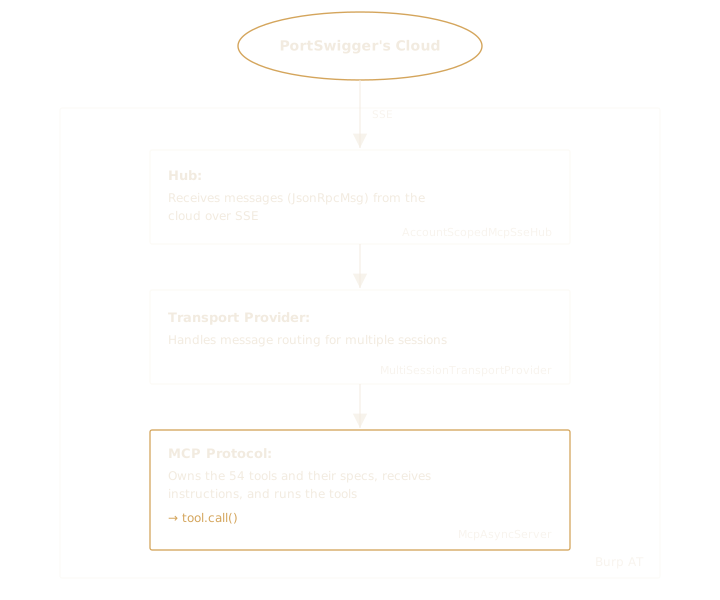 Figure 26 — Cloud messages reaching Burp AT over SSE GET.
AccountScopedMcpSseHub and MultiSessionTransportProvider are both imported from the ai/sdk/ module and ultimately serve as the transport layer that enables communication with the cloud.
Sending messages to the cloud over HTTP POST
In contrast to Burp opening a long-lived SSE stream to receive messages throughout the session, sending requires Burp to fire an HTTP POST for every message sent. This process can be classified into two main workflows, depending on the trigger:
- Burp tool returns a result that needs to be sent to PortSwigger cloud’s AI.
- A user prompt that needs to be processed by the cloud’s AI.
These two workflows are handled independently, which will be discussed next.
Workflow 1: tool result
The procedure for getting the message to the cloud in this workflow similarly resembles the message-receiving procedure via SSE GET, involving three components for each step:
- The MCP server receives the tool’s return value, wraps it in a JSON-RPC response, and passes it to the transport.
AccountScopedMcpTransportreceives the JSON-RPC message and sends it to the hub.AccountScopedMcpSseHubserializes the message to JSON text and posts it to PortSwigger’s cloud.
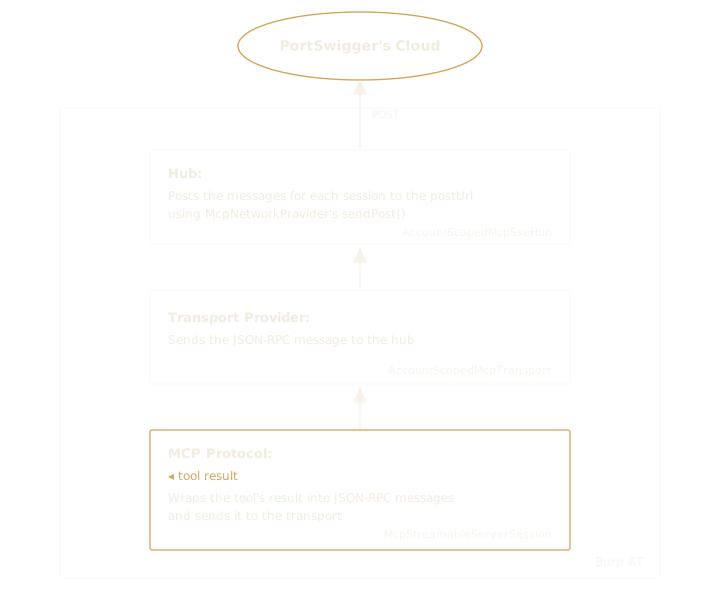 Figure 27 — Burp AT sending tool results to PortSwigger’s cloud over HTTP POST.
Because an HTTP POST is made for every message sent to the cloud, and Burp may have multiple sessions running at the same time (say, one for a dispatched long-running background task and the other for user interaction), each message that goes to the cloud is attached with a sessionID and connectionID in the HTTP header. (Reference: postForSession at AccountScopedMcpSseHub.class)
Workflow 2: user prompt
Tracing how messages reach the cloud from a user prompt is slightly tricky since the plaintext messages and all conversation-specific strings are encrypted. The components that handle the transport of a tool’s return value do not seem to handle the user prompts.
I performed a dynamic analysis to pin down the exact classes. Three tools are involved in this attempt before nailing down the workflow.
Tool 1: Arthas
Arthas is a diagnostic tool for Java applications. It works by attaching to a running JVM, so developers can watch a method’s arguments live. This tool is meant for troubleshooting.
Outgoing messages are sent using the sendPost() method, defined only in McpNetworkProvider, which is eventually used in AccountScopedMcpSseHub to post the message. The first instinct is to watch how sendPost() is called, but we first need to identify which class serves as the network provider. Dumping the hub instance shows exactly that, along with other assets.
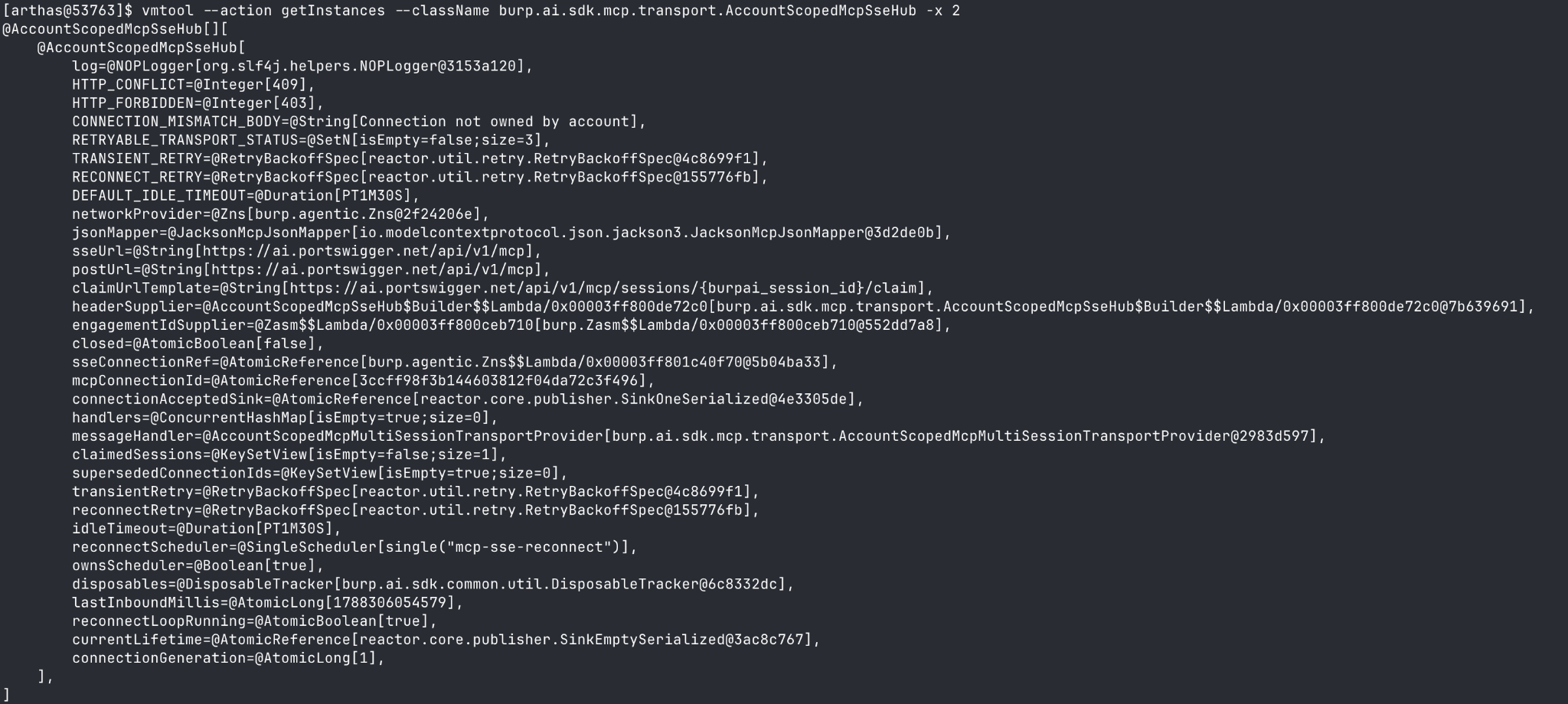 Figure 28 — Zns is the network provider class, along with the SSE and POST URL values.
Pinning down the exact network provider class allows us to watch sendPost in action. I was expecting to see the user prompt in plaintext, but found nothing similar during the runtime capture, though it spits out the HTTP header values and whatnot.
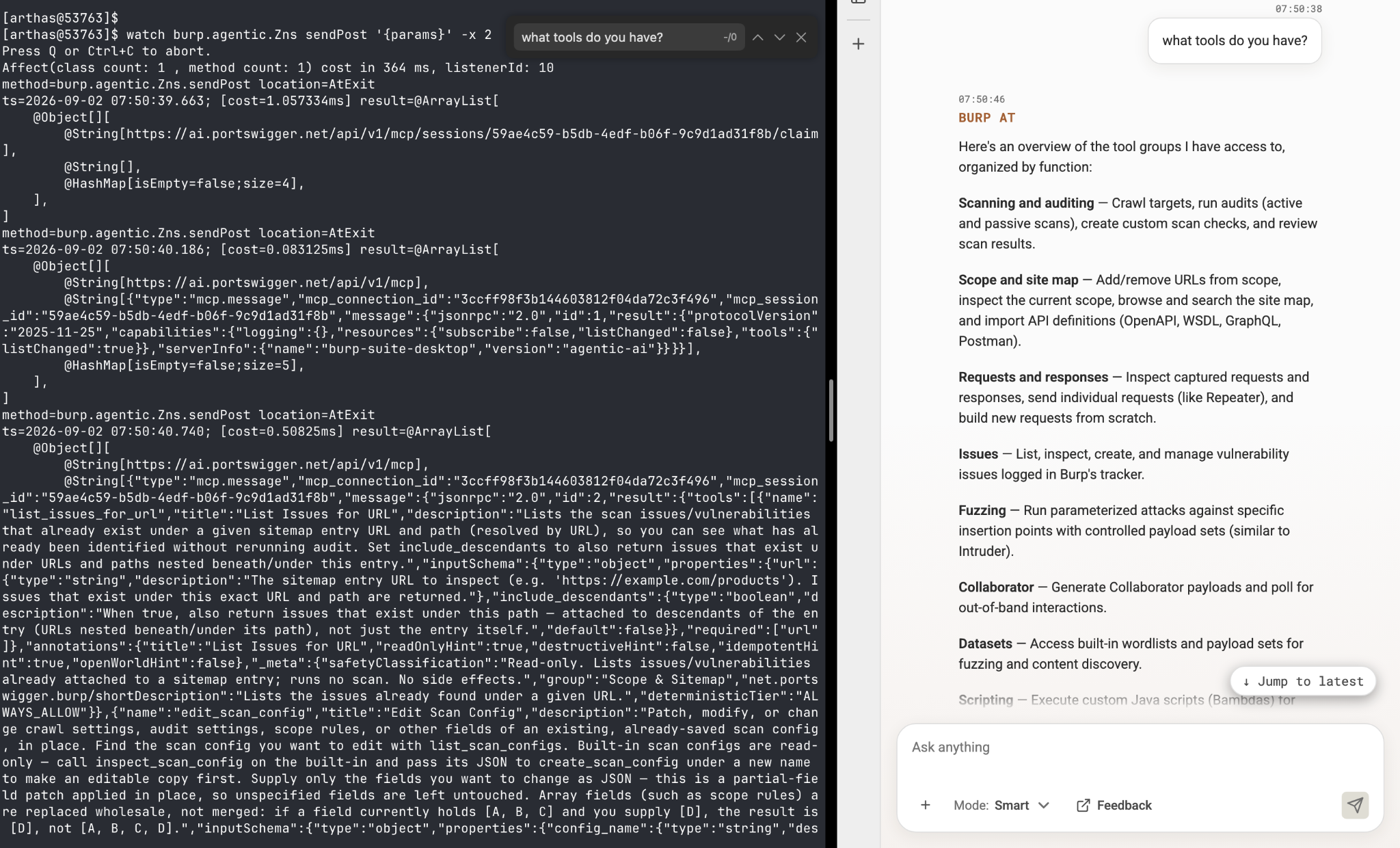 Figure 29 — Runtime capture of sendPost() in the Zns class.
Tool 2: Mitmproxy
My second attempt involves Mitmproxy. Running it in local mode and scoping it to Burp’s PID fails to reveal the packet in mitmweb. Instead, the terminal indicates a failed TLS handshake, and no connection was established, so I decided to drop this method and capture the packets at a lower level.
Tool 3: Wireshark
We know from tool 1’s output that Burp communicates with the cloud over HTTPS to https://ai.portswigger.net/api/v1/mcp. Pairing this information with a simple lsof to snapshot Burp’s live connection, we can see the exact host IP address communicating with Burp this entire time: 18.165.122.68:443, an AWS CloudFront IP, through the en0 interface.
Burp does not use any native TLS at all. It purely implements JDK JSSE (Java Secure Socket Extension), which works in our favor. The plan here is to:
- Capture traffic using
tcpdumpon theen0interface. - Attach a key-extraction agent (GitHub) to Burp’s PID (used in step 4).
- Trigger a fresh handshake and send a prompt to Burp AT.
- Decrypt the traffic in Wireshark using the key-extraction agent.
Pure JSSE means the TLS session keys reside in Java objects inside the JVM, where the key-extraction agent can hook the JSSE key-derivation code and dump the keys to a key-log file. Separately, tcpdump passively captures the encrypted traffic. Loading both the capture and the dumped keys into Wireshark lets it decrypt those packets, resulting in clear-text traffic.
With the traffic decrypted, filtering for the conversation stream reveals the full turn in plain text. The user prompt goes up as a POST …/messages with a {"text":…} body, and the assistant’s reply streams back down over SSE.
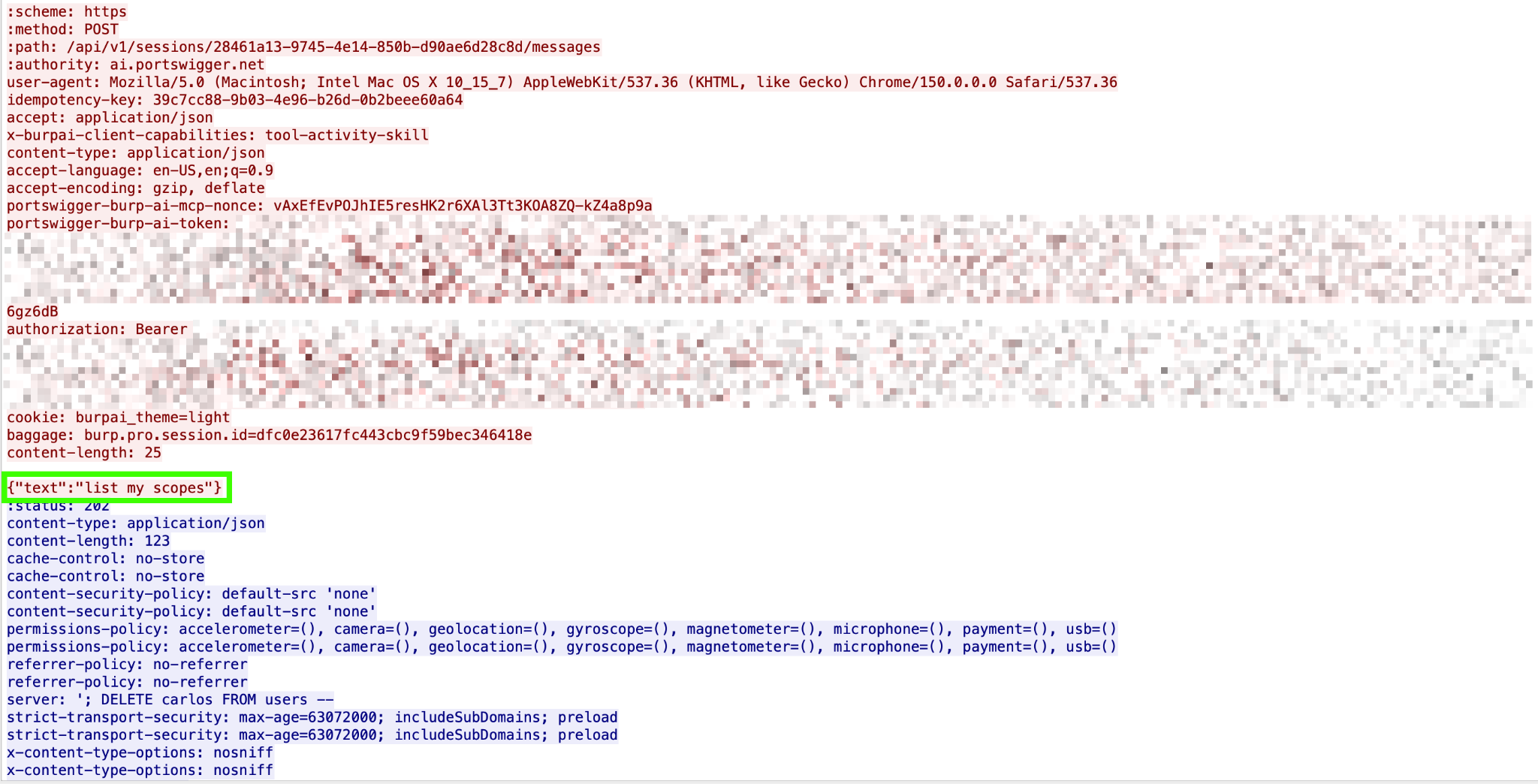 Figure 30 — Wireshark packet capture for the client-server communication.
It’s actually interesting to see the AG-UI protocol in action, showing the AI agent’s complete turns:
User prompt:
id:28461a13-9745-4e14-850b-d90ae6d28c8d:9193069
event:CUSTOM
data:{"type":"CUSTOM","timestamp":1788311235033,"name":"hakawai.user_message_persisted","value":{"type":"user_message_persisted","turn_id":"788becad-b745-5fff-b075-d6b04d1380e8","message_id":"f72b39a3-8cbd-5180-90a3-2f0336d3e62d","role":"user","text":"list my scopes","attachments":[],"staged_context":[],"created_at":"2026-09-02T01:07:15.004893Z"}}
Session renamed:
id:28461a13-9745-4e14-850b-d90ae6d28c8d:9193070
event:CUSTOM
data:{"type":"CUSTOM","timestamp":1788311235732,"name":"hakawai.session_renamed","value":{"type":"session_renamed","version":1,"burpai_session_id":"28461a13-9745-4e14-850b-d90ae6d28c8d","account_id":"{account_id}","name":"Scope Management Query","name_source":"auto","occurred_at":"2026-09-02T01:07:15.728343203Z","metadata":{"ephemeral":true}}}
Assistant’s response:
id:28461a13-9745-4e14-850b-d90ae6d28c8d:9193072
event:TEXT_MESSAGE_START
data:{"type":"TEXT_MESSAGE_START","timestamp":1788311243278,"messageId":"98d146fc-6fe9-475f-a4d8-9d6367285756","role":"assistant"}

id:28461a13-9745-4e14-850b-d90ae6d28c8d:9193073
event:TEXT_MESSAGE_CONTENT
data:{"type":"TEXT_MESSAGE_CONTENT","timestamp":1788311243281,"messageId":"98d146fc-6fe9-475f-a4d8-9d6367285756","delta":"Your Burp Suite target scope is currently empty — there are no included or excluded rules configured. To begin testing, provide"}

id:28461a13-9745-4e14-850b-d90ae6d28c8d:9193075
event:TEXT_MESSAGE_CONTENT
data:{"type":"TEXT_MESSAGE_CONTENT","timestamp":1788311243664,"messageId":"98d146fc-6fe9-475f-a4d8-9d6367285756","delta":" the target domains, hosts, or URLs you'd like added to scope."}
Finish reasoning:
id:28461a13-9745-4e14-850b-d90ae6d28c8d:9193076
event:TEXT_MESSAGE_END
data:{"type":"TEXT_MESSAGE_END","timestamp":1788311243737,"messageId":"98d146fc-6fe9-475f-a4d8-9d6367285756","metadata":{"finishReason":"stop"},"finishReason":"stop"}

id:28461a13-9745-4e14-850b-d90ae6d28c8d:9193077
event:RUN_FINISHED
data:{"type":"RUN_FINISHED","timestamp":1788311243740,"threadId":"28461a13-9745-4e14-850b-d90ae6d28c8d","runId":"788becad-b745-5fff-b075-d6b04d1380e8","outcome":{"type":"success"}}
All these turns, for a complete conversation.
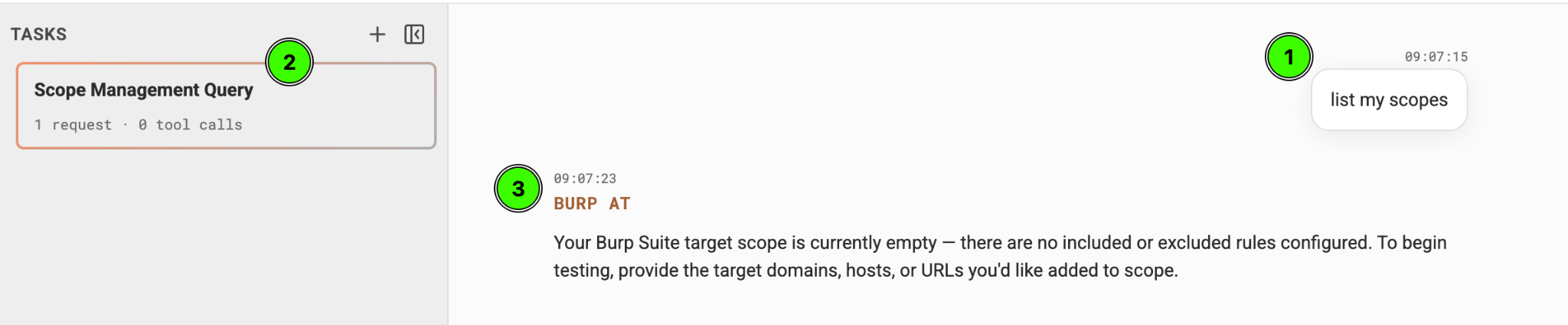 Figure 31 — AG-UI on the surface level.
The cloud endpoints
While the SSE, POST, and Claim URLs are all visible when dumping the hub’s instances using Arthas, it is also possible to find out by tracing the Z-classes (the hard way).
The SSE/HTTP messenger AccountScopedMcpSseHub is built in the Zwm class and contains the classes that hold the cloud’s URL. These URLs are the endpoints for SSE GET and HTTP POST.
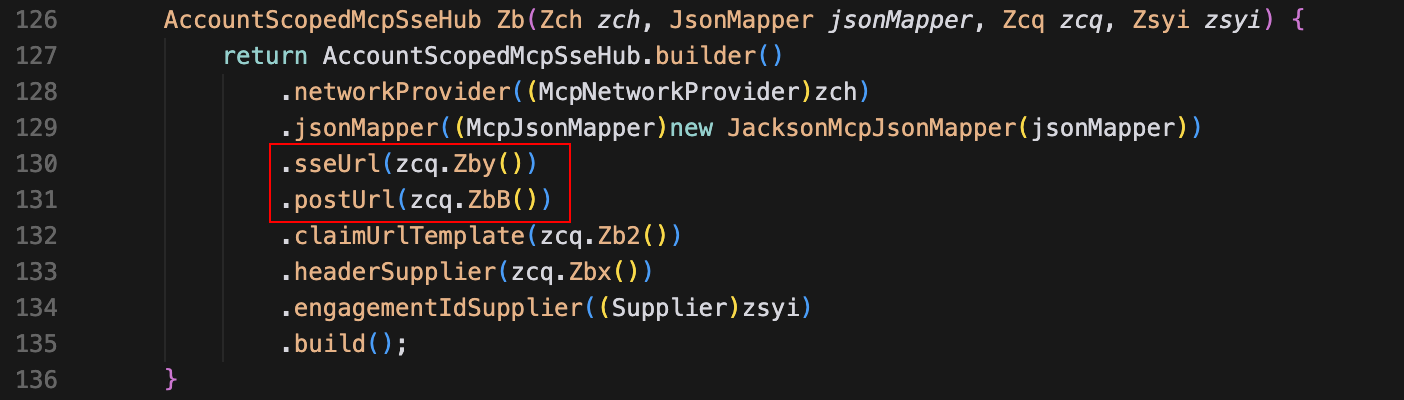 Figure 32 — Zwm.java, the hub communicating with the SSE/POST URLs.
The process of tracing the URL values involves a series of unzipping, decompiling, and searching within the obfuscated Z-classes; a total of 6 hops.
Jumping straight to the results, the server’s endpoints are enumerated:
- Base URL =
https://ai.portswigger.net - Development URL =
https://hakawai.platform-dev.portswigger.io - Localhost =
http://localhost:9080 - SSE/POST URL =
https://ai.portswigger.net/api/v1/mcp - Claim URL =
https://ai.portswigger.net/api/v1/mcp/sessions/{burpai_session_id}/claim
These values came from deobfuscating the Z-classes:
zby=string2, zbB=string2, zb2=string3
String string2 = base + "/" + "api/v1/mcp";
String string3 = string2 + "/sessions/{…}/claim";
Plugging it into the method call in Zwm:
.sseUrl(zcq.Zby()).postUrl(zcq.ZbB()).claimUrlTemplate(zcq.Zb2())Which resolves to:
.sseUrl(string2).postUrl(string2).claimUrlTemplate(string3)Note: the base URL derives its values from the property and env, and falls back to a default value in case neither the env nor the property resolves. This scenario assumes the property and env specifically exist for PortSwigger’s own dev/test, and production uses the default value, given that Arthas shows that Burp communicates with https://ai.portswigger.net.
Workflow diagram
To conclude this write-up, here’s a complete communication workflow between PortSwigger’s cloud and Burp AT tools, down to how user prompts and tool results have a full-turn communication with the LLM.
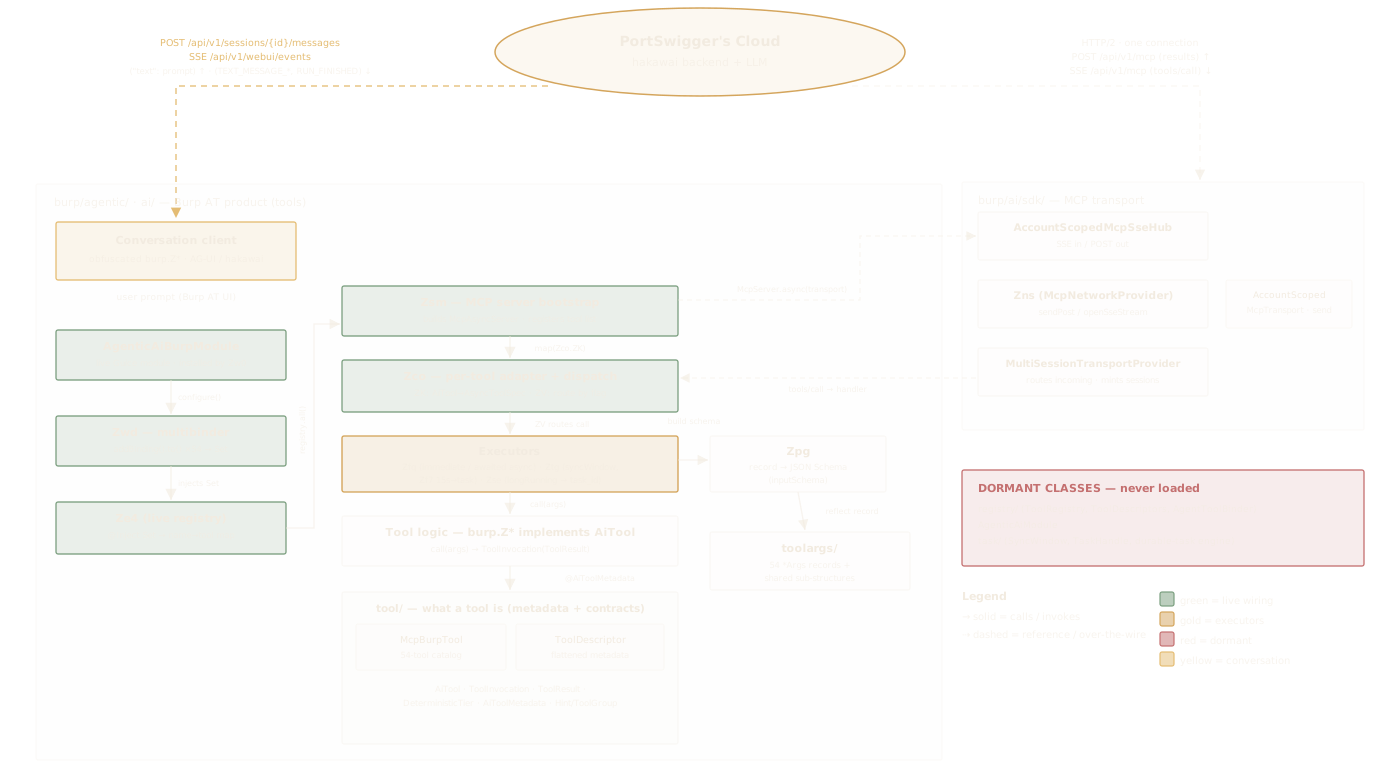 Figure 33 — Burp AT workflow diagram.
Across static, dynamic, and decrypted-traffic analyses, Burp AT makes Burp Suite an MCP server by exposing 54 focused tools. Meanwhile, the actual intelligence (the LLM, skills, and system prompts) stays in PortSwigger’s cloud. Without ever seeing the model, Burp AT’s task is to: (1) send user prompts and tool results, and (2) run the tools the cloud asks for.
Two points that make this design worth paying attention to:
- The design is governed by default. Ask/Act deterministic tier guards offensive tools with permission, making Burp AT more opsec-friendly than the older Burp AI.
- Splitting work into 54 narrow, single-purpose tools keeps the agent’s context clean and its actions auditable.
The whole process reveals that user prompts are serialized over TLS before being sent to the cloud, and the core model stays out of reach on the user’s end.